
Request and approval workflows
Connect supported forms or lists to approval stages, reminders and recorded outcomes with agreed delegation rules.
ITZ / AI & AUTOMATION / DUBAI & UAE
Make your Microsoft workplace work together.
Build practical workflows around Microsoft 365 and supported connectors. Connect requests, approvals and records with appropriate permissions and an operating plan.

THE BUSINESS PROBLEM
A Microsoft 365 subscription does not automatically deliver a maintained business workflow. Teams still need a process owner, suitable connections, permissions, licensing and a plan for the account or administrator that operates the automation.
WHAT WE CAN IMPLEMENT
Connect supported forms or lists to approval stages, reminders and recorded outcomes with agreed delegation rules.
Route documents and metadata through controlled review steps while retaining appropriate access to the source.
Create supported notifications and tasks with useful context, avoiding uncontrolled distribution of confidential information.
Plan environments, connection ownership, release records, access and failure notification for the agreed workflow.
TRY THE PROCESS
INTERACTIVE EXAMPLE · PRESET SAMPLE DATA
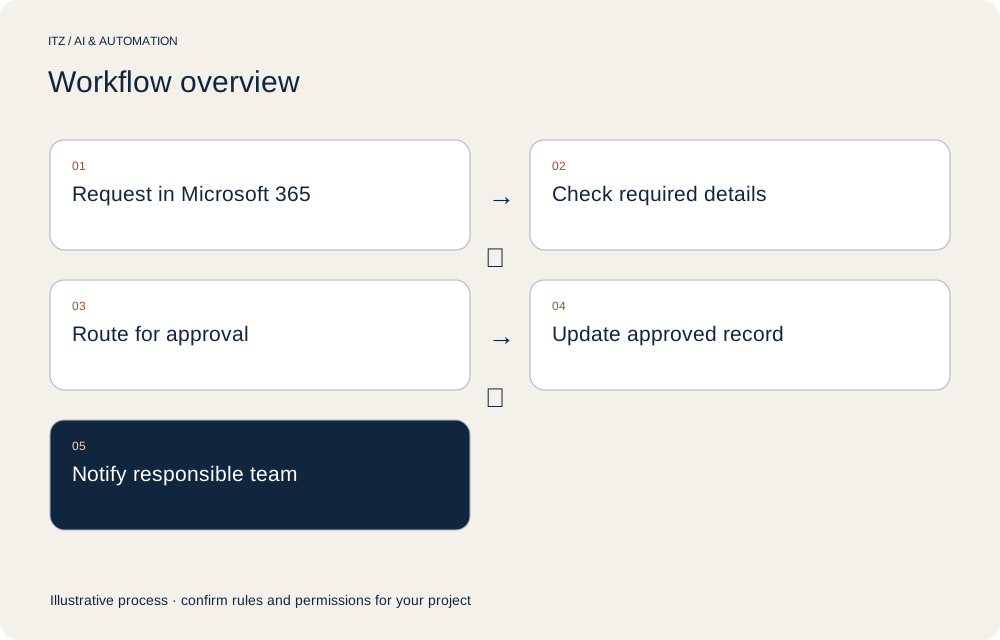
An employee submits a purchase request. Required details are checked and the named approver receives the request. Approval updates the record and notifies the responsible team. An overdue request is escalated; a reminder is not treated as authorisation to purchase.
Request created → named approver accepts → record updated → responsible team notified.
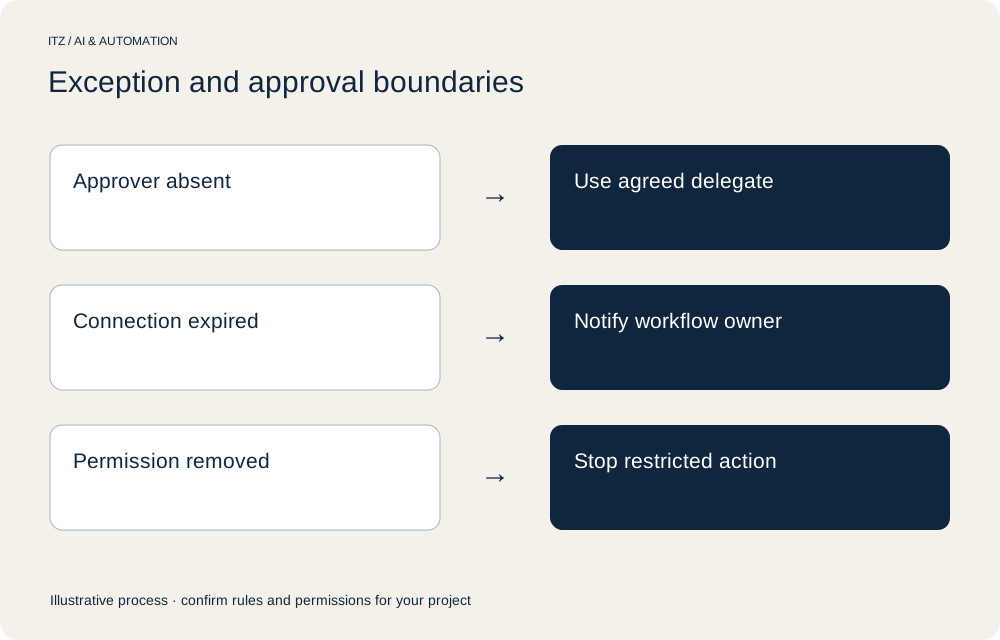
Request remains pending → agreed delegate or escalation used → no automatic purchase authorisation.
Authentication fails → restricted action stops → workflow owner receives an alert.
CHOOSE THE RIGHT APPROACH
Start with the capabilities already available in your tenant, then verify the licences required for the proposed connectors and AI actions. Keep routine tenant administration separate from workflow implementation and long-term process ownership.
EXPLAINED VISUALLY
WHAT YOU RECEIVE
The proposal specifies what will be configured, developed, documented and tested. Access to bespoke work, third-party platform ownership and administration rights are agreed before implementation.
Handover records the operating owner, support route and actions that remain manual. An attractive demonstration is not acceptance evidence for your business process.
DATA & RESPONSIBILITIES
Identify the business owner, information owner and administrator. Agree the accounts, permitted operations and information that may be sent to each provider. Test access with representative user roles rather than relying only on administrator results.
Data location, retention and deletion depend on the selected services and configuration. Confirm those requirements before choosing the architecture; a platform logo is not evidence of residency or compliance.
DESIGN FOR EXCEPTIONS
IMPLEMENTATION APPROACH
Review representative inputs, users, systems and decisions. Identify work that should remain manual and dependencies that prevent a reliable pilot.
Agree scope, permissions, acceptance examples, operating costs and responsibilities. Use redacted or appropriate test information.
Check routine, missing-data, declined-action and failure scenarios. Compare the implemented behaviour with the written scope.
Agree activation, rollback and monitoring. Provide the documented administration path and a named owner for operational exceptions.
COMMERCIAL SCOPE
A pilot quote should state included volumes, assumptions and what happens if usage increases. No fixed saving, implementation duration or universal accuracy level is promised.
EVIDENCE BEFORE EXPANSION
Separate submitted, approved, rejected and unresolved items.
Review failed runs and recurring authentication problems.
Measure the full period and identify waiting time.
Review required licences, AI usage and actual execution volume.
Agree the baseline, sample, start and end events before comparing results. Report failed cases and manual corrections alongside completed runs. These are proposed measures, not ITZ client performance claims.
AFTER ACTIVATION
Agree the alert destination and owner. Logging an error without anyone reviewing it is not an operating plan.
Changes to source fields, credentials, prompts, documents or APIs can affect outcomes. Review and test material changes before release.
Explain routine use, manual overrides and escalation. Document the tasks that remain the customer’s responsibility.
FIT & LIMITATIONS
Platform access, technical feasibility and delivery availability are confirmed during scoping. Broader migrations, data cleansing, custom applications and unsupported integrations are separately assessed.
FREQUENTLY ASKED QUESTIONS
Entitlements depend on the licence and capabilities used. The proposed connectors, premium features and AI actions need a specific licensing review; do not assume the existing subscription covers them.
They need an ownership and connection plan. We document the agreed operating identity, access, handover and monitoring responsibilities to reduce reliance on an individual employee.
Support covers ongoing tenant and user administration. This service designs, builds and hands over an agreed business workflow using Microsoft tools.
START WITH ONE WORKFLOW
Bring the process. We will help clarify the next step.
We agree feasibility, scope and timing after reviewing your requirements. Implementation and ongoing support are quoted separately where applicable.
Talk to ITZ on WhatsApp ↗Please share requirements rather than passwords, access tokens or confidential customer records.